Lighthouse User Interface
Lighthouse offers an easy to navigate interface to manage your network.
If you are transitioning from Lighthouse 24.02 or earlier, you can Download the navigation reference guide for details about the differences in navigation.
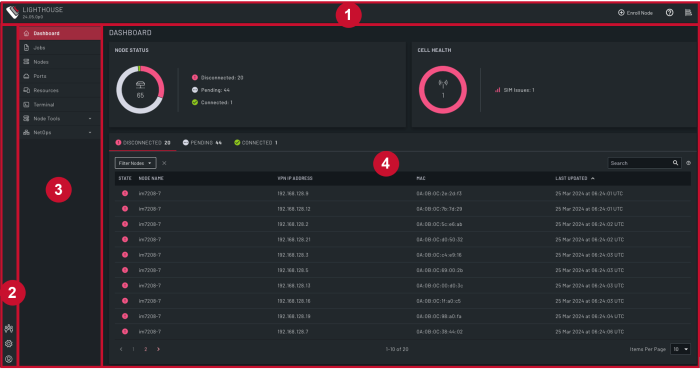
The user interface consists of the following main sections:
-
Header Pane: Access to the Help menu, information for the Lighthouse instance, and a shortcut to enroll a node.
-
Settings Pane: Access to Lighthouse settings including users and account management menu, settings menu, and user options.
-
Menu Pane: Access to key dashboards to manage nodes, ports, connected resources, and jobs, along with tools to configure nodes, access to a local web-based terminal, and NetOps management.
-
Main Pane: The main information pane.