CentOS as Host
CentOS should be installed, complete with the Gnome desktop environment as the host operating system. CentOS includes the full complement of KVM-centric virtualization tools including the GUI-based virtualization management tools Boxes and virt-manager and the shell-based virtualization management tool virsh.
This procedure assumes Boxes is used to setup and manage the Lighthouse VM and that the required PKZIP archive, lighthouse-<year>-<month>-<version>-ovf.zip is in ~/Downloads.
To install Lighthouse on CentOS:
-
Unzip
lighthouse-<year>-<month>-<version>-ovf.zip.
The Lighthouse.ovf folder is created in ~/Downloads and contains the following files and folders: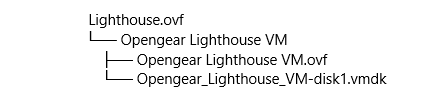
-
Launch Boxes.
-
Click New in the Boxes title bar.
-
Navigate to ~/Downloads/Lighthouse.ovf/Opengear Lighthouse VM/.
-
Select Opengear Lighthouse VM and click Open.
A new virtual machine, called Opengear LighthouseVM is added to the list of virtual machines available to Boxes.Note: If Boxes is unable to identify the base operating system on the image file, a message displays and a drop-down list is provided. From the drop-down list, select one of the "Generic Linux" options.