External Certificate Authority Page
To open this page, in the Settings Pane, select  > SECURITY > External Certificate Authority.
If you have not yet configured any external certificate authorities, a warning displays at the top of the page.
You can use this page to:
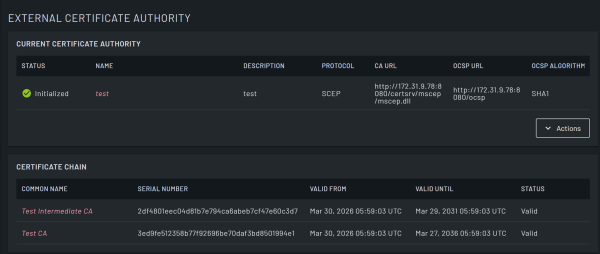
| Field | Description |
|---|---|
|
Current Certificate Authority |
|
| Status | Read-only field that displays the configuration status of the external certificate authority from Configured, Pending Initialization, Initialized, and Error. |
| Name | Name of the certificate authority to configure. Click this to open the Edit External Certificate Authority dialog and view or edit the configured CA. |
| Description | Read-only field that displays the description of the external certificate authority. |
| Protocol | Read-only field that displays the protocol that the external certificate authority uses. |
| CA URL | Read-only field that displays the URL that Lighthouse uses to communicate with the certificate authority. |
| OCSP URL | Read-only field that displays the optionally configured URL to check certificate status using OCSP. |
| OCSP Algorithm | Read-only field that displays the algorithm used to sign OCSP responses. The default algorithm is SHA1, but SHA256 is also supported. |
| Actions |
Click this button to access the following options:
|
| Configure External Certificate Authority | Click this button to open the Configure External Certificate Authority dialog and configure an external CA. |
| Initialize External Certificate Authority | Click this button to initialize an external certificate authority. |
| Certificate Chain
This table displays the root chain of certificates from the External CA. |
|
| Common Name | The entity name to which the certificate is issued. Click the common name to view detailed information about the certificate in the Root Certificate Details dialog. |
| Serial Number | Read-only field that displays the serial number assigned by the CA. |
| Valid From | Read-only field that displays the date from which the certificate is valid. |
| Valid Until | Read-only field that displays the date until which the certificate is valid. |
| Status | Read-only field that displays the status of the certificate. |
Configure/Edit External Certificate Authority dialog
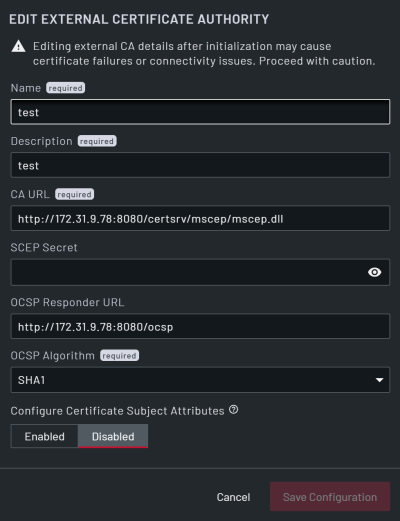
| Field | Description |
|---|---|
| Name | Enter a name for the certificate authority to configure. This is a string with a maximum length of 64 characters. This field is mandatory. |
| Description | Enter a description of the certificate authority. This is a string with a maximum length of 128 characters. |
| CA URL | Enter the URL that Lighthouse uses to communicate with the certificate authority. This is a string that contains the full URL that Lighthouse uses to communicate with the external CA, including any CA identification string. This field is mandatory. |
| SCEP Secret | Enter the pre-shared secret to use for all requests to the configured CA. This is a stored encrypted string. This field is mandatory. |
| OCSP Responder URL | Enter the optional responder URL to check certificate status using OCSP. |
| OCSP Algorithm | From the drop-down, select the algorithm used to sign OCSP responses. You can select from SHA1 (default) and SHA 256. |
| Configure Certificate Subject Attributes | Select whether to Enable or Disable certificate subject attributes. If you select Enabled, additional fields display. |
| Country | Enter the country for the certificate authority. This field displays if Configure Certificate Subject Attributes is set to Enabled. |
| State/Province | Enter the state or province for the certificate authority. This field displays if Configure Certificate Subject Attributes is set to Enabled. |
| Locality | Enter the locality for the certificate authority. This field displays if Configure Certificate Subject Attributes is set to Enabled. |
| Organization | Enter the organization for the certificate authority. This field displays if Configure Certificate Subject Attributes is set to Enabled. |
| Organizational Unit | Enter the organizational unit for the certificate authority. This field displays if Configure Certificate Subject Attributes is set to Enabled. |
| Email Address | Enter the organization for the certificate authority. This field displays if Configure Certificate Subject Attributes is set to Enabled. |
| Cancel | Click to cancel all updates. |
| Save Configuration | Click to save all updates. The Confirm External Certificate Authority Configuration dialog displays. |
Confirm External Certificate Authority Configuration
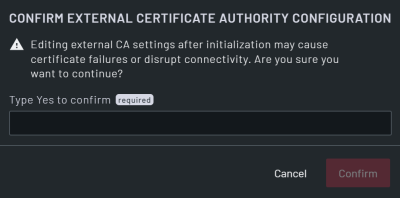
| Field | Description |
|---|---|
| Type Yes to confirm | Type "yes" to confirm the configuration of the external CA. This field is mandatory. |
| Back | Click this button to return to the Configure External Certificate Authority dialog. |
| Confirm | Click this button to confirm the configuration and return to the External Certificate Authority page. |
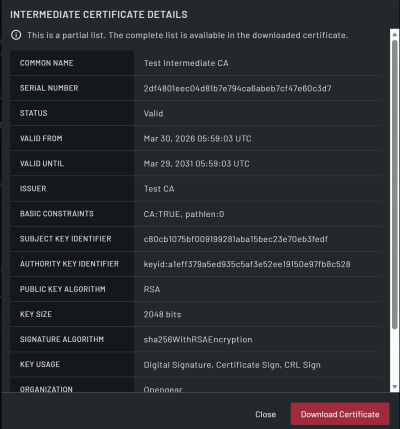
| Field | Description |
|---|---|
| Common Name | Read-only field that displays the common name for the certificate authority. |
| Serial Number | Read-only field that displays the serial number of the certificate issued by the External CA. |
| Status | Read-only field that displays the status of the certificate. |
| Valid From | Read-only field that displays the date from which the certificate is valid. |
| Valid Until | Read-only field that displays the date until which the certificate is valid. |
| Issuer | Read-only field that displays the certificate authority that signed and issued the certificate. |
| Basic Constraints | Read-only field that displays whether the certificate can act as a CA (issue other certificates) and, if so, how deep the certificate chain can be. |
| Subject Key Identifier | Read-only field that displays the unique identifier (hash) of the certificate’s public key. |
| Authority Key Identifier | Read-only field that displays the identifier for the CA’s public key that signed the certificate. |
| Public Key Algorithm | Read-only field that displays the type of cryptography used for the certificate’s public key. |
| Key Size | Read-only field that displays the length/strength of the certificate’s public key in bits. |
| Signature Algorithm | Read-only field that displays the algorithm the CA used to sign the certificate. |
| Key Usage | Read-only field that displays the allowed cryptographic operations for the certificate’s key. |
| Extended Key Usage | Read-only field that displays the purpose of the certificate. |
| Subject Alternative Name | Read-only field that displays any alternative names for which the certificate is valid. A domain name can be an IP address or a domain. |
| OCSP URL | Read-only field that displays the URL to check certificate status using OCSP. |
| Authority Info Access | Read-only field that displays where to find the issuing CA’s certificate and/or the OCSP responder for revocation checks. |
| CRL Distribution Points | Read-only field that displays the URLs where you can find the certificate’s revocation list (CRL). |
| Fingerprint (SHA-256) | Read-only field that displays a SHA-256 hash of the certificate. |
| Close | Click this button to close the dialog. |
| Download Certificate | Click this button to download the certificate. |
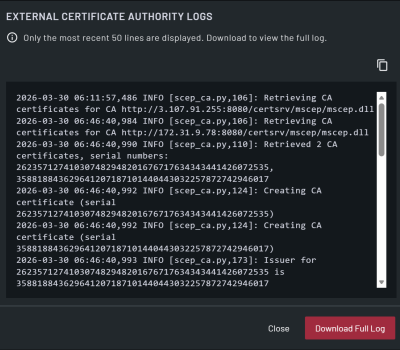
EXTERNAL CERTIFICATE AUTHORITY LOGS dialog
| Field | Description |
|---|---|
| Logs | Displays the last 50 lines of the external CA log. To view all logs, click Download Full Log. |
| Close | Close the dialog. |
| Download Full Log | Download the full logs locally. |