Cellular Modem
Note: This section applies to cellular variants only. The OM1300 does not support cellular connectivity.
The Cellular Modem page is a WebUI-based tool you can use to run and view a diagnostic summary of the cellular modem status for an Opengear device. The summary includes key test results, signal metrics, and troubleshooting guidance.
Note: You can also use this tool in the CLI, see Run Diagnostics with Modem-Test.
To run or view the summary, click MONITOR > Cellular Modem.
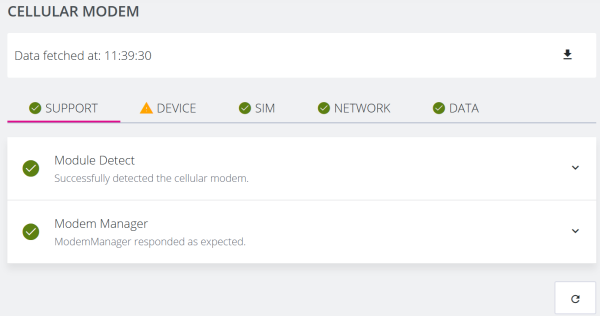
When the page opens, the:
-
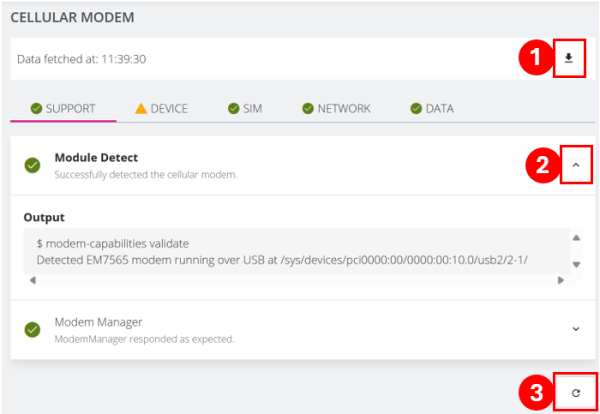
top of the page displays the last time the tests ran.
-
following tabs display summaries for each group of test results:
-
Support: Test results for support, such as Module Detect, and Modem Manager.
-
Device: Test results for the device, such as Device Information, Device Image Status, Device Module Info, Device Firmware Info, and Device Operating Mode.
-
SIM: Test results for the SIM, such as SIM Slot Status.
-
Network: Test results for the network, such as Signal Strength Status, Signal Info, Network Status, Access Technology Status, and Operator Network Status.
-
Data: Test results for data, such as Packet Data Protocol Context and Data Connection Status.
-
You can also click the:
-
Download button to download a text version of the results.
-
Chevron to expand the summary and view more detailed test result information.
-
Refresh button to re-run the tests for interactive troubleshooting.