Out-Of-Band Failover
Out-Of-Band (OOB) Failover detects network disruption via the probe interface, and automatically activates a cellular or ethernet interface connection to re-establish network access.
OOB failover requires an IPv4 address (in dotted decimal format), or an IPv6 address, or a domain name, which is always reachable and unlikely to change. When OOB failover is enabled, the node regularly pings this address, using the probe interface, to check for network connectivity.
If you enable OOB failover:
-
The system pings the probe address via the probe interface.
If you have added a second probe address, only one of the two addresses needs to be reachable. -
When the probe interface comes up, the probe address is pinged every 30 seconds and sends three ping packets.
If the first probe address fails, the second address is attempted, when means six ping packets are sent per 30 seconds. -
After four consecutive ping failures, OOB failover is triggered. This means a connection failure is detected after approximately two minutes.
-
When failover is triggered, the pinging continues. If a ping succeeds, the system discontinues OOB failover. To help prevent interface flapping, the system does not do this until 60 seconds after OOB failover is triggered.
-
If the prob interface does not come up, the ping test never runs and OOB failover is triggered after five minutes.
Enable Out-Of-Band Failover
-
To manage out-of-band failover, navigate to the CONFIGURE > NETWORK RESILIENCE > OOB Failover page.
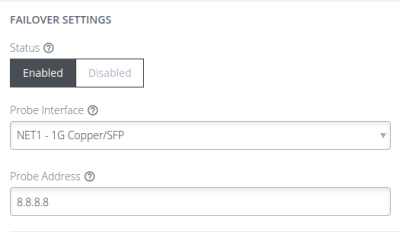
Probe Interface: this is the interface that is used to test if ping can reach the configured address.
Probe Address: the ipv4 or ipv6 or domain name of the address that is “pinged”.
-
In the Failover Interface section, select the failover interface from the drop-down list.
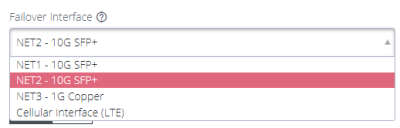
Configurable probe (failover from) and failover (failover to) interfaces are shown:-
NET1 - the default probe interface.
-
Cellular - the default failover interface for cellular-capable models.
-
NET2 - the default failover interface for non-cellular models.
-
-
When you have completed the OOB Failover set-up, ensure the OOB Failover status is set to Enabled, then, click Apply.
A confirmation displays. -
On the Network Interfaces page, the Failover Interface displays "Configured for OOB Failover" beside the interface name.

-
When failover is triggered, the interface is marked with the warning: OOB Failover Active to an Admin user when logged in.
 Note:
Note:- It may take up to five minutes for a failover to actually occur after the probe stops connecting to the probe address.
- The shortcut button Enabled/Disabled is disabled or removed when an interface is in active failover.
DNS Queries on a Dormant Failover Interface
The Dormant DNS option allows DNS queries on the failover interface to be disabled in normal operation so that DNS queries can be paused.
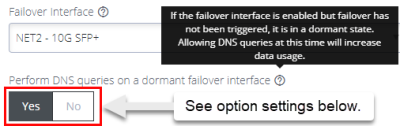
The option configures how the DNS name servers and search domains configured for the failover interface are used by the system.
-
If set to Yes, the DNS name servers and search domains configured for the failover interface will always be available to the system for DNS name resolution. Allowing DNS queries while failover has not been triggered make it more likely that DNS requests are made over the cellular interface which increases data usage.
-
If set to No, the DNS name servers and search domains are made available to the system only when the failover state is active.
To configure the DNS name servers and search domains, see DNS Configuration.
OOB Failover Types & Failover Behavior
| OOB setting |
Failover Interface |
Mode | Description |
|---|---|---|---|
| Disabled | Enabled | Always up OOB | When OOB Failover is disabled, the default outgoing interface cannot be specified, the default route is selected automatically. Outbound network connections (e.g. VPN client tunnels, SNMP alerts) are established according to the main static routing table, regardless of network state. |
| Enabled | Disabled | Failover mode | Failover detection is enabled on the selected “probe” interface. The network or cellular interface remains in a down state with no network configuration. When failover is initiated, the network or cellular interface is started and configured. If a default route is installed on the interface, it takes precedence over the default route on the failed “probe” interface. Outbound network traffic (e.g. VPN client tunnels, SNMP alerts) are established or re-established over network or cellular connection during failover. The advantage of this mode is the secondary connection is completely inactive during normal operation which may be advantageous where the goal is to keep the interface off the Internet as much as possible, e.g. a cellular plan with expensive data rates and no carrier-grade NAT. |
| Enabled | Enabled | Dormant failover |
Failover detection is enabled. Only inbound connections on the network or cellular interface are routed back out the network or cellular interface, to enable OOB access from remote networks (e.g. incoming SSH). Otherwise, outbound network connections (e.g. VPN client tunnels, SNMP alerts) are established according to the main static routing table, regardless of network state. When failover is initiated, the default route of the network or cellular interface takes precedence over the failed “probe” interface. Outbound network traffic (e.g. VPN client tunnels, SNMP alerts) are established or re-established over the network or cellular connection during failover. The advantage of this mode is the network or cellular connection is available for inbound out-of-band access during normal operation. |