Cell Health Reporting Page
To open this page, in the Settings Pane, select  > SERVICES > Cell Health Reporting.
You can use this page to enable cell health reporting.
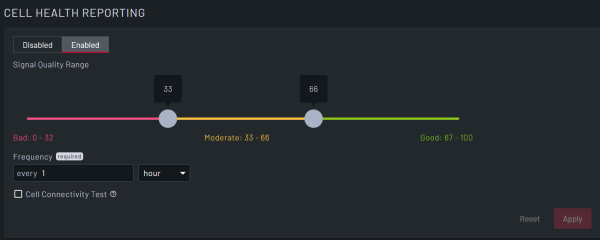
| Field | Description |
|---|---|
| Disabled/Enabled | Select to enable or disable cell health reporting. If this is set to Disabled, then the fields do not display and Lighthouse does not run the cell health check. |
| Signal Quality Range | Set the signal quality ranges to report. Click and drag the range handles to the range value corresponding to: Bad, Moderate, and Good. |
| Frequency | Set the frequency with which Lighthouse checks the signal quality. You can set this in minutes, hours, or days. |
| Cell Connectivity Test | Select this check box to enable a cell connectivity test and get a complete cell health report. This causes cell data consumption. |
| Reset | Clear all selections. |
| Apply | Apply all selections. |