Configuration Selector
The configuration selector is a section within the CONFIGURATION MANAGEMENT page.
The following fields/options are available:
| Field | Description |
|---|---|
| Section List | Displays a list of sections added to the profile. Click the section to display the fields and settings in the Configuration section. |

|
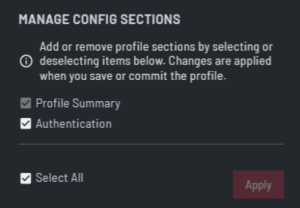
Click to open the MANAGE CONFIG SECTIONS dialog and add or remove configuration sections from the profile. |
| Field | Description |
|---|---|
| Configuration Section | Select or deselect the check boxes to add the relevant configuration sections to the profile. For more information about sections, see Configuration Sections. |
| Select All | Select the check box to add all available configuration sections to the profile. |
| Apply | Click to add and apply the selected configuration sections to the profile. |