Task Details Page
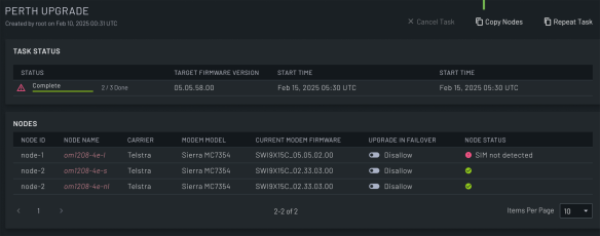
To open this page, in the Menu Pane, select  Node Tools > Firmware Upgrade, then select the NODE FIRMWARE or MODEM FIRMWARE tab, and click on the task name in the TASKS column in the table.
On this page you can:
| Section/Field | Description | |
|---|---|---|
| Cancel Task | Click this to cancel the task. You can only cancel a task if it has not yet started. | |
| Copy | Click this button to open the Setup Upgrade Task section of the New Node Firmware Upgrade page with the nodes displayed on the page preselected in the new task. This applies only for node firmware upgrades. | |
| Repeat Task | Click this button to open the Setup Upgrade Task section of the New Node Firmware Upgrade page with any nodes that previously failed the upgrade preselected. This applies only for node firmware upgrades. | |
| TASK STATUS | Status | Read-only field that displays the status of the task. |
| Target Firmware Version | Read-only field that displays the target firmware version if the upgrade is successful. | |
| Start Time | Read-only field that displays the time the task started. | |
| End Time | Read-only field that displays the time the task ended. | |
| NODES | Node ID | Read-only field that displays the ID for the node. |
| Node Name | The node name. Click this to open the NODES page and view details for the node. | |
| Model | Read-only field that displays the model of the node. | |
| Modem Model | Read-only field that displays the model of the modem used by this node. | |
| Upgrade Status | Read-only field that displays the status of the individual upgrade. | |
| Items Per Page | Use the drop-down to select the number of nodes to display per page. | |